


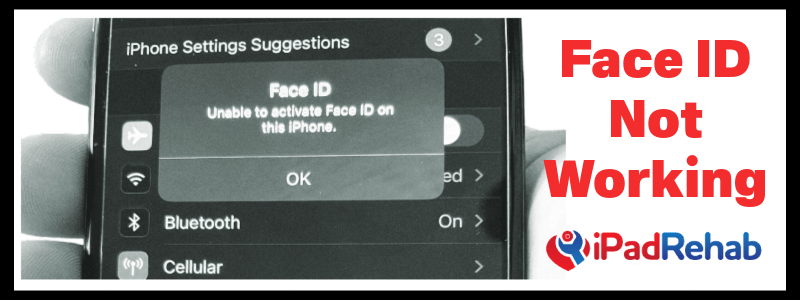
You’re probably here because Face ID is not working on your iPhone, and you’re wondering how to fix it. The good news is that most of the common Face ID problems are repairable.
Let’s start with an understanding of how Face ID and the TrueDepth camera system works inside your iPhone.
These are the key components of iPhone facial recognition:
1.) The Flood Illuminator: this tiny laser is the “porch light” of the Face ID system.
2.) The Dot Projector: this component uses a prism to project an array of infrared dots onto your face
3.) The “TrueDepth Cameras” include these two cameras with stereovision for depth perception
a.) The normal front facing, aka selfie, camera
b.) The infrared or IR camera
Unfortunately, none of these components can simply be swapped out from a working phone because each of them is cryptographically tied to the CPU of your phone. This may change as right to repair legislation makes its way across the world. However, with microsoldering, we CAN repair many of the common problems that cause Face ID not to work in today’s phones.
If we imagine an opened iPhone as a clam, the Face ID components are split between the top and bottom ha
lv
es of the clam.
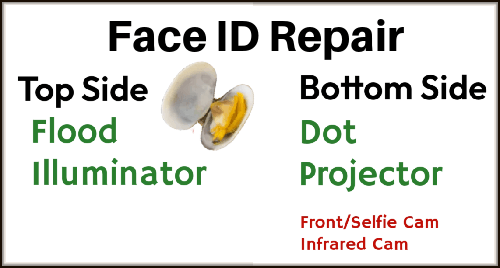
The MOST common problems with Face ID not working are problems with the Flood illuminator on the top side, i.e. the screen.
The most common cause of Face ID not working is:
FLOOD ILLUMINATOR PROBLEMS
-
Water damage to the flood illuminator. Even just a single drop of water from a Clorox wipe, or a drop of sweat from your morning run can work its way through the ear speaker mesh on the front of the phone, and cause corrosion under the flood illuminator
- Torn front flex. For iPhone and iPads alike, if the thin black flex that connects the flood illuminator to the logic board is accidentally torn during a screen replacement, then the flood illuminator won’t be able to turn on the porch light of the Face ID system.
When Face ID is not working because of a FLOOD ILLUMINATOR problem, you will see a notification that says “Unable to activate Face ID” If you try to turn on Face ID from within settings, you will get an error “Face ID not available, try again later.”
This problem can almost always be solved! As long as the flood illuminator itself is not damaged, the tiny laser can be desoldered from its native flex, cleaned, and resoldered on a known good flex from another phone. You can see a video of us performing this procedure here. (LINK) This will bring back Face ID function that is lost after water damage or from a torn flex accident.
Other problems with Face ID can result from damage to the TrueDepth camera system, including the dot projector. With water damage, we will often see the “unable to activate Face ID message” which prompts a flood illuminator transfer as described above. After clearing that problem, then secondary Face ID problems may be revealed within the True Depth system on the bottom of the clamshell.
The IR cam and the Front/Selfie camera are both unique and cryptographically tied to your device. While these parts can easily be replaced by anyone, your phone REQUIRES involvement of the Apple-controlled GSX system to pair your phone with any replacement part in order to retain Face ID function. If you find that your front camera is not functional (try to take a selfie) then that’s the end of the line for Face ID.
DOT PROJECTOR PROBLEMS
The good news is that the most common “bottom side” Face ID problem is a failure of the DOT PROJECTOR.
The dot projector component is the small glass-like square adjacent to the TrueDepth cameras. This component has an internal fuse that is quick to ‘self destruct’ This can happen through water exposure, or even by simply touching it. (Don’t touch the dot projector!)
When the dot projector fails, this can be determined by connecting a QianLi dot projector reader. If the dot projector is bad, then the reader will report that. The procedure to replace the dot projector requires specialty equipment--the dot projector must be removed, altered, and soldered to a new custom receiver QianLi dot flex, then a read/write operation to transfer the serial number and finally a delicate epoxy operation to glue the prism in place. After that, Face ID will be restored in all but a handful of severe cases that have damage to the Front/Selfie or IR camera.
Click here for the tools that we recommend for Face ID repair, and check out our Face ID repair video on YouTube.
Qianli Dot Projector Face ID Programmer
Face ID Reballing Stencil and Fixture
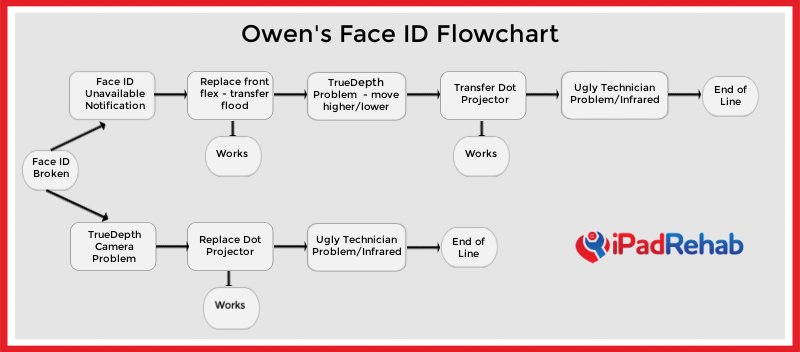
Our in-house Face ID expert, Owen Rodgers, has put together a flowchart for you to use to help you diagnose iPhone Face ID problems. We hope you like it!
Need help with a repair get started here.